
Boostup FAQ's
A simple guide to what you may notice, what is normal, and how we keep your account safe.
Table Of Content
- How to prepare to get started?
- How to Connect BoostUp with LinkedIn?
- What happens when I connect my LinkedIn account to BoostUp?
- Why was my LinkedIn password changed during setup?
- Why is two-factor authentication enabled and important for my account and how to enable it?
- How to verify my LinkedIn account?
- Can I still use LinkedIn normally?
- Should I Reply to Prospects on LinkedIn or Only on BoostUp?
- How to Reply to Prospects on BoostUp?
- How to download all 1st Degree Connections?
- Why did LinkedIn send me a login alert?
- Why are connection requests going to people I do not know?
- Why are my pending requests higher than usual?
- Why am I seeing CAPTCHA or phone verification?
- What is SSI score and why did my SSI score change?
- Where I can see my current SSI Score?
- Why am I getting profile views from people I never searched for?
- Why did LinkedIn log me out?
Getting Started
How to prepare to get started?
Before connecting your account to BoostUp, please complete the following steps:
- Update Your Password: Change your password at least two days before connecting your account. Ensure the new password is strong and secure.
- Verify Your Account: If your account is not yet verified, please complete the verification process.
- Enable Two-Factor Authentication (2FA): Activate 2FA to add an extra layer of security to your account.
Completing these steps will help ensure a smooth and secure connection with BoostUp.
How to Connect BoostUp with LinkedIn?
- Go to software.digitalgowhere.com and log in using the credentials provided by your BoostUp account manager.
- On the dashboard, click “Connect Account Manually.”
- Select your location, add a proxy or domain (optional), and set your time zone and work hours.
- Enter your LinkedIn login email and password & select use boostup browser to login.
- Click Connect to complete the setup.
Your account is successfully connected when your LinkedIn profile replaces the blank avatar and the system starts syncing your profile data.
What happens when I connect my LinkedIn account to BoostUp?
BoostUp logs into your LinkedIn profile to run outreach on your behalf. Because of that, you will usually see an extra active session on your account. That is expected.
Why was my LinkedIn password changed during setup?
We reset it to a strong, unique password so the account starts from a clean and more secure place. This also helps us avoid weak or reused credentials
Why is two-factor authentication enabled and important for my account and how to enable it?
- Why enable 2FA?
We reset it to a strong, unique password so the account starts from a clean and more secure place. This also helps us avoid weak or reused credentials
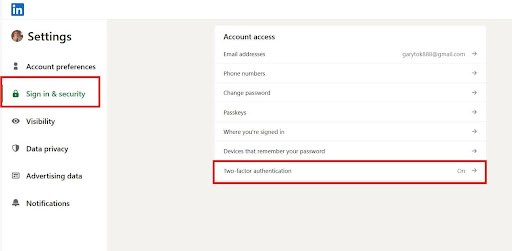
- How to enable 2FA:
- Log in to your LinkedIn account.
- Click your profile icon (top right) and select Settings & Privacy.
- Go to Sign-in & Security.
- Click Two-step verification and select Turn on.
- Choose your preferred method (Authenticator app or SMS).
- Follow the prompts and enter the verification code to complete the setup.
How to verify my LinkedIn account?
Verifying your account helps confirm your identity and improves account security.
Steps to verify your LinkedIn account:
- Log in to your LinkedIn account.
- Click your profile icon and go to Settings & Privacy.
- Navigate to Account Preferences.
- Find the Identity Verification option.
- Follow the prompts to verify your identity using the available verification method (such as email, phone, or ID verification).
- Once completed, your LinkedIn account will be verified, helping protect your profile and improve trust on the platform.
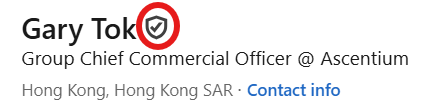
Once completed, your LinkedIn account will be verified, helping protect your profile and improve trust on the platform.
Can I still use LinkedIn normally?
Yes but do not login your account on more than 2 devices and do not perform any aggressive activity like sending 20 to 30 connection request in a go. You can keep posting, replying, browsing, and using the platform as you usually do. Normal activity on your side is healthy for the account.
Should I Reply to Prospects on LinkedIn or Only on BoostUp?
Yes, you can reply to prospects directly on LinkedIn, and the conversation will sync automatically with BoostUp.
However, it is generally recommended to reply through BoostUp, as it helps with better tracking, organization, and effective conversation management.
How to Reply to Prospects on BoostUp?
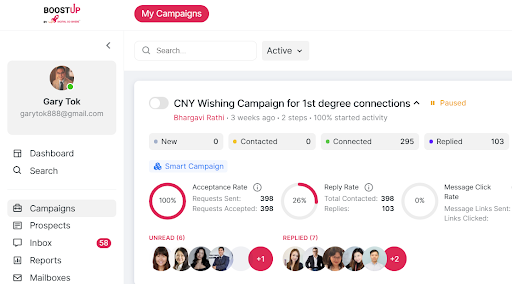
Just login into your Boostup account and navigate to inbox section you will see all your messages there.
How to download all 1st Degree Connections?
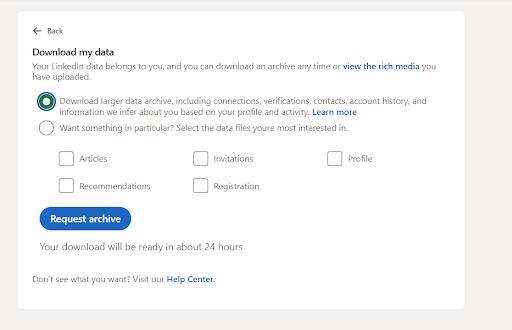
- Log in to your LinkedIn account and go to Settings & Privacy.
- Click on Data Privacy.
- Select Get a copy of your data.
- Choose Connections (1st option).
- Click Request Archive.
LinkedIn will prepare your file and send it to you, which may take up to 24–25 hours.
Multiple Logins & Locations
Why do I see sessions from different countries?
Your own login is one session. BoostUp may use a region-matched proxy for outreach, and our team may also access Sales Navigator for list building. That can make the account appear active from more than one location.
Should I remove unfamiliar sessions?
Please check with the BoostUp team first. Ending the wrong session can interrupt a live campaign and trigger extra security checks.
How many active sessions are normal?
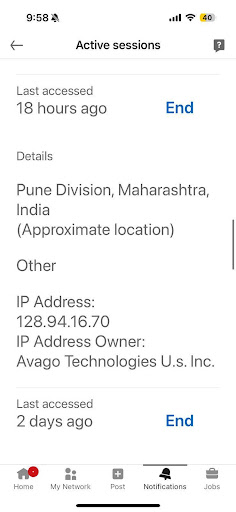
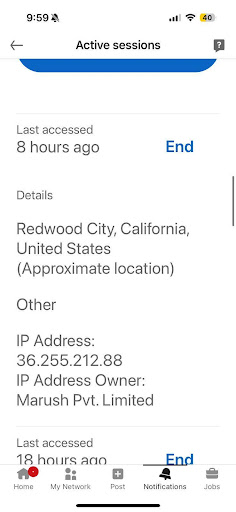
In most cases, two to three active sessions are normal: your own login, the outreach session, and sometimes a Sales Navigator session managed by our team.
For Example:
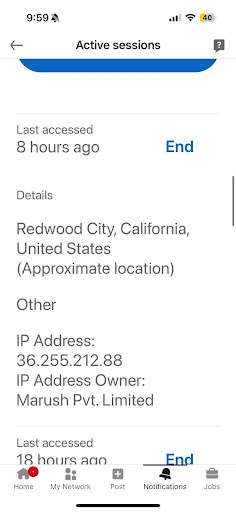
If you live in Hanoi and targeting the ICP region in USA you may see 2 to 3 logins:
One from Our System (For Sales Navigator) Generally from Pune, Maharashtra
One from Targeting Region (USA)
One from Hanoi (your own session)
How BoostUp Works with LinkedIn
Why does BoostUp need Sales Navigator access?
Sales Navigator helps us build better prospect lists using filters like role, company size, industry, and location. That helps outreach stay focused and relevant.
Does BoostUp run all day and night?
No, Activity is controlled to look natural. Campaigns run during business hours, avoid weekends, vary their pace, and include rest periods.
Can I log into LinkedIn while BoostUp is active?
Yes. LinkedIn supports multiple sessions. You can use your account as usual while campaigns are running.
Things You May Notice
Why did LinkedIn send me a login alert?
That usually happens the first time BoostUp connects from a new device or location. It is a normal setup alert, not a reason to panic.
Why are connection requests going to people I do not know?
That is part of the outreach campaign. The contacts are selected to match your target audience, not chosen at random.
Why are my pending requests higher than usual?
Campaigns naturally raise pending requests because not everyone accepts right away. We monitor this and clear older requests when needed.
Why am I seeing CAPTCHA or phone verification?
LinkedIn sometimes asks for extra verification when it detects location changes, travel, or more activity than usual. It is a routine check.
What is SSI score and why did my SSI score change?
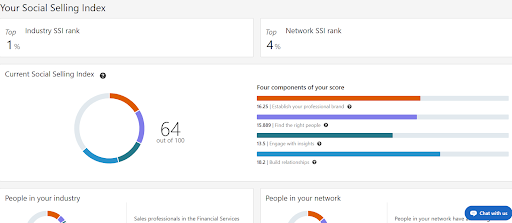
The SSI (Social Selling Index) score is a LinkedIn metric that measures how effectively you use the platform to build your professional brand, find the right people, engage with insights, and build relationships.
Your SSI score may change when your profile views, messaging activity, and outreach increase. In most cases, as you become more active and engage more with your network, the score gradually improves over time.
Where I can see my current SSI Score?
Steps to check your SSI score:
- Go to: https://www.linkedin.com/sales/ssi
- Log in to your LinkedIn account if prompted.
- You will see your overall SSI score out of 100 along with a breakdown of the four areas LinkedIn measures.
These four areas include:
- Establishing your professional brand
- Finding the right people
- Engaging with insights
- Building relationships
Why am I getting profile views from people I never searched for?
When prospects see your profile as part of campaign activity, some of them visit your profile back. That is usually a good sign.
Why did LinkedIn log me out?
A temporary logout can happen after session changes or proxy rotation. It is usually harmless. Just log back in and let us know if it keeps happening.
How We Protect Your Account
What does BoostUp do to reduce account risk?
We use strong passwords, enable 2FA, apply region-matched proxies, vary activity levels, avoid weekends, set daily caps, and include warm-up and rest periods.
Can LinkedIn detect automation?
No system can promise zero risk, but BoostUp is designed to stay within cautious activity ranges and avoid repetitive patterns that attract attention.
Is it safe for my account to be active from more than one country?
Yes, in many business setups that is normal. What matters more is how the account behaves, not just where it is accessed from and if you have sales navigator or recruiter
If Something Goes Wrong
What should I do if LinkedIn restricts my account?
If your LinkedIn account becomes restricted, there’s no need to worry, this can occasionally happen as part of LinkedIn’s standard security and verification processes.
To resolve this, simply follow the on-screen recovery steps provided by LinkedIn. This may include signing back into your account and completing any required identity verification checks. In most cases, access is restored within their usual review timeframe.
In the meantime, we recommend informing the BoostUp team right away so we can pause any ongoing activity and ensure your account remains safe. Our team will also guide you through the process and monitor the situation closely.
As an added precaution, once access is restored, you may consider temporarily lowering activity settings for a short period to stay within optimal limits.
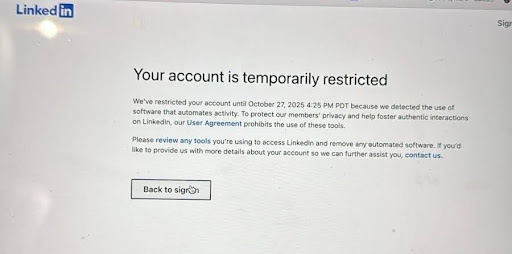
In Most Cases, you will get your account back right away and we will stop any kind of outreach from your account for next 2 months.
Will I lose my data or connections if there is a temporary restriction?
No. A temporary restriction does not usually erase your profile, messages, or network.
What will BoostUp do if my account gets flagged?
We pause all activity, log out active sessions on our side, help you through recovery, and only restart later with more conservative settings.
I am worried about my account. What should I do first?
Do not change passwords or end sessions in a rush. Contact your BoostUp account manager first so we can verify what is happening and guide you calmly.